Mainframe Tutorial
 JCL Tutorial
 Introduction
 Mainframe Tips & Tricks
 Mainframe Interview Q&A
 Troubleshooting
 Mainframe Quiz
 Mainframe Online Tests
 Mainframe Jokes/Memes
 Mainframe Tools
 Contact us
 About us
ISPF Tips & Tricks
 Backward

SRCHFOR popup - search up to 6 strings at once
We all know that SRCHFOR operation in mainframe is available to search sting in members. Multiple PDS or in multiple PS files. You can issue this command after typing some kind pattern of dataset or PDS (like MYID.MYPS.FILE.*) then issue SRCHFOR or you can issue it after viewing PDS.
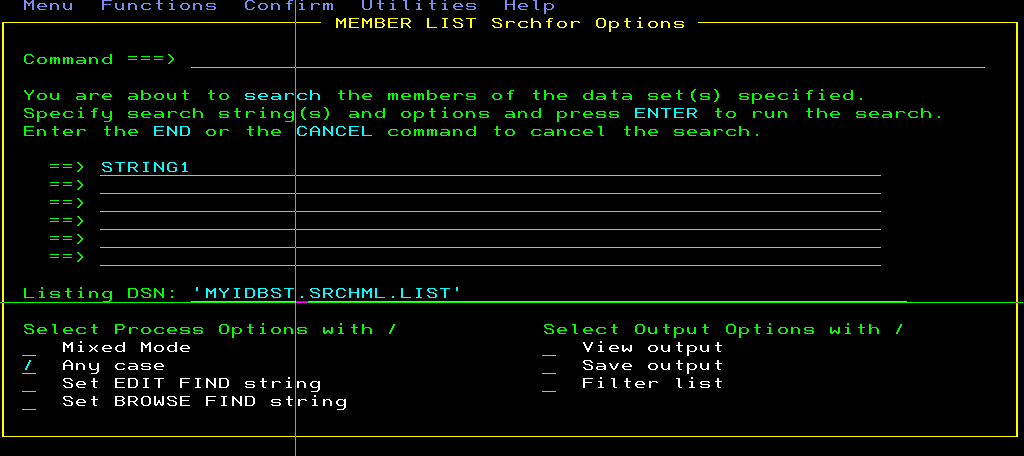
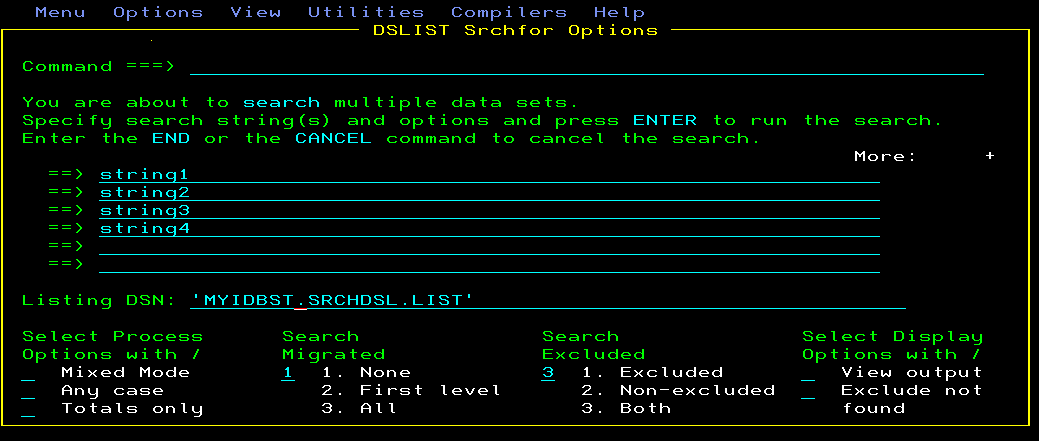
Now I will tell you trick that only few knows. Generally, people issue “SRCHFOR <STRING-TO-BE SEARCHED>”. But to better customize your search and to search more than one strings (up to 6) you can just type SRCHFOR and then press enter. Below pop-up will appear when you issue only SRCHFOR on DSLIST screen shown below

And below pop-up will be displayed when you only issue SRCHFOR after opening PDS