
 Mainframe Tutorial
 JCL Tutorial
 Introduction
 Mainframe Tips & Tricks
 Mainframe Interview Q&A
 Troubleshooting
 Mainframe Quiz
 Mainframe Online Tests
 Mainframe Jokes/Memes
 Mainframe Tools
 Contact us
 About us
Module 12: CICS Resource Definitions and Administration
 Backward

CICS Resources
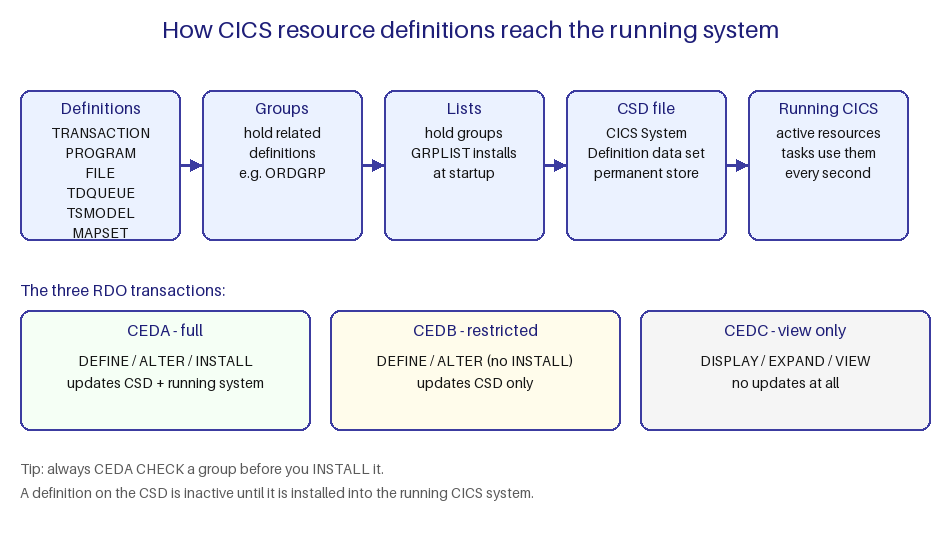
A CICS region cannot run your application until it knows about everything the application uses. These things - transactions, programs, files, maps, queues - are called CICS resources. This page explains what resources are, where their definitions live, and how they reach the running system.
What is a CICS resource
- A resource is anything CICS must know about before your task can use it. Common examples are TRANSACTION, PROGRAM, FILE, MAPSET, TDQUEUE, TSMODEL, TERMINAL and PROFILE.
- A transaction id typed at a terminal means nothing until a TRANSACTION definition tells CICS which PROGRAM to start.
- A file read by your program fails until a FILE definition tells CICS the dataset name (DSNAME) behind the file name your program uses.
- Resources exist only as definitions first. Defining is describing the resource on the CSD; installing is making it active in the running region.
- Some resources are created statically with CEDA and installed, others are created dynamically - for example autoinstall builds terminal definitions on the fly from a model.
Where definitions are stored
- Resource definitions are stored in the CICS System Definition (CSD) data set. The CSD is a VSAM file shared by CICS systems.
- Definitions live inside groups. A group is a named collection of related definitions, for example ORDGRP holding all order-entry resources.
- Groups are collected into lists. A list is installed in one step, so it is the unit of installation.
- The system initialization parameter GRPLIST names the list installed automatically at CICS startup. Resources in that list are available from the first second the region is up.
- The CSDACC parameter controls access: READWRITE lets a region update definitions, READONLY lets it only install them.
- The offline batch utility DFHCSDUP can list, add, alter and delete definitions without a running CICS region.
How definitions reach the running system
- Step 1 - define: use CEDA (full power), CEDB (no install) or CEDC (view only) to create the definition on the CSD.
- Step 2 - check: run CEDA CHECK on the group to catch errors before they can hurt the live system.
- Step 3 - install: CEDA INSTALL GROUP(name) copies the definitions from the CSD into the running region, making them active immediately.
- Only installed definitions affect live work. Changing a definition on the CSD alone does nothing until you install it.
- Alternatively, EXEC CICS CREATE commands build resources in the running system without touching the CSD at all.
Example - look at everything defined in one group:
CEDA EXPAND GROUP(ORDGRP)
TRANSACTION(ORD1) PROGRAM(ORDPGM) FILE(ORDFIL)
MAPSET(ORDMAP) TDQUEUE(ORDLOG)
RESULT: 5 definitions shown. Group ORDGRP is not locked.