
 Mainframe Tutorial
 JCL Tutorial
 Introduction
 Mainframe Tips & Tricks
 Mainframe Interview Q&A
 Troubleshooting
 Mainframe Quiz
 Mainframe Online Tests
 Mainframe Jokes/Memes
 Mainframe Tools
 Contact us
 About us
Module 1: Endevor Introduction
 Backward

Endevor- Introduction
Endevor (full name: Broadcom Endevor Software Change Manager, formerly CA Endevor) is the most widely used source code management tool on the IBM mainframe. If you work in a bank, insurance company, airline, or government mainframe shop, your COBOL programs, copybooks, JCL, and CICS maps almost certainly live inside Endevor, not in plain PDS libraries.
Endevor does three jobs at once: it stores every version of every source member (version control), it compiles and links programs automatically with the right options (build management), and it controls how code travels from development to production with approvals (change management). Learning it is essential for any mainframe developer interview and for day-to-day mainframe work.
What Endevor does for a mainframe shop
- Keeps a single controlled copy of every source element - no more "which PDS has the latest version" confusion.
- Stores every change as a versioned level, so you can see who changed what, when, and why, and retrieve any old version.
- Compiles, link-edits, and binds programs automatically through generate processors with shop-standard options.
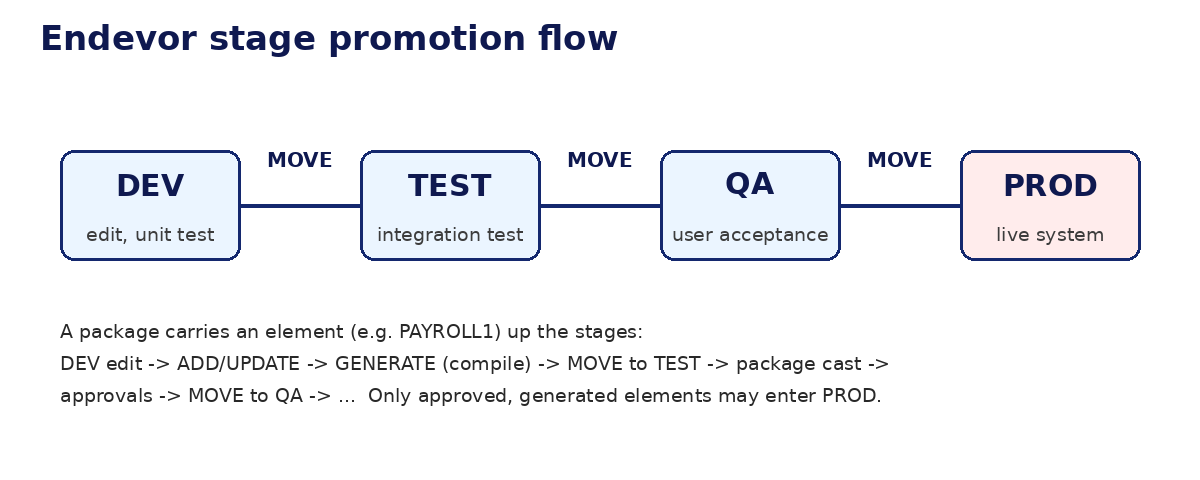
- Moves code through stages (DEV, TEST, QA, PROD) in a controlled way - nothing reaches production without approval.
- Prevents two developers from overwriting each other's changes with a signout (lock) mechanism.
- Produces a full audit trail: CCID, comments, timestamps, and user IDs are stamped on every action.
- Packages related changes together so a release moves as one tested unit, and can be backed out as one unit.
Why shops use Endevor instead of plain PDS libraries
- A PDS member has no history: once you save over it, the old code is gone. Endevor keeps every level forever (or per retention rules).
- Two developers editing the same PDS member overwrite each other silently. Endevor requires a signout, so the second developer gets a clear warning.
- Compiling from a PDS depends on the developer remembering the right compile options. Endevor's processors guarantee identical, repeatable builds.
- Auditors demand proof of who changed production code and who approved it. Endevor records all of this automatically; PDS libraries record nothing.
- Moving dozens of members to production by hand (IEBCOPY jobs) is slow and error-prone. Endevor packages move everything in one controlled action.
Key vocabulary you must know
- Environment - one Endevor database, usually one per LPAR group or application area, e.g. DEMO, PROD.
- System - a major division inside an environment, e.g. PAYROLL.
- Subsystem - a part of a system, e.g. ONLINE (CICS programs) or BATCH (batch programs).
- Element - one member under Endevor control, e.g. the COBOL program PAYROLL1.
- Type - what kind of member the element is: COBOL, COPY, JCL, ASM, LINK, PROC, and so on.
- Stage - a step in the lifecycle inside an environment: D (development), T (test), Q (QA), P (production).
- Processor - a program (usually JCL) that builds outputs, e.g. compiles COBOL and link-edits the load module.
- Footprint - a token Endevor stamps into generated outputs (load modules) proving they were built by Endevor.
- Delta - the stored difference between two levels of an element; Endevor keeps full current source plus deltas for history.
- CCID (Change Control ID) - a tracking number, often the change ticket number, required on almost every action.
- Package - a container that moves a tested set of changes through stages and approvals as one unit.
- SCL (Software Control Language) - Endevor's batch command language: ADD, UPDATE, GENERATE, MOVE, DELETE, and more.
- Signout - a lock on an element: the signed-out user "owns" the current change until they sign it back in.
Endevor vs Git - an honest comparison
- Git is distributed: every developer has a full clone. Endevor is centralized: one master inventory on the mainframe.
- Git merges branches freely. Endevor controls concurrent work with signouts - only one active change per element by default.
- Git stores source only. Endevor stores source plus the build recipe (processors), so "how was this load module built" is never a mystery.
- Git has no built-in promotion or approval workflow for production. Endevor's stages, packages, and approver groups are built for regulated industries.
- Learning both is ideal: Endevor for the mainframe job you have, Git concepts for everything else in your career.
How a typical change flows through Endevor
- RETRIEVE the element from Endevor to your own PDS, which signs it out to you.
- Edit the source in your PDS with the ISPF editor.
- ADD the element (first time) or UPDATE it (later changes) back into the DEV stage.
- GENERATE the element: Endevor compiles and links it with the standard processor.
- Unit test your program in the DEV environment.
- MOVE the element to the TEST stage when it works, or bundle it into a package.
- The package is CAST, approved by the approver group, and EXECUTED - Endevor moves everything to PROD.
Who uses Endevor in a shop
- Developers - retrieve, edit, add, update, generate, and move elements; build and cast packages.
- Approvers - review and approve or deny packages; usually team leads or release managers.
- Endevor administrators - define environments, systems, types, processor groups, approver groups, and security rules.
- Auditors - read the audit trail: every action is stamped with user, date, time, CCID, and comment.