
 Mainframe Tutorial
 JCL Tutorial
 Introduction
 Mainframe Tips & Tricks
 Mainframe Interview Q&A
 Troubleshooting
 Mainframe Quiz
 Mainframe Online Tests
 Mainframe Jokes/Memes
 Mainframe Tools
 Contact us
 About us
Module 2: Endevor Inventory Stages
 Backward

Endevor- Inventory and Stages
Everything Endevor controls lives in its inventory - a structured database (the Master Control Files) that knows every element, every version, and every stage. Understanding the inventory structure is the key to using Endevor: every action you ever run names an element by its full inventory address.
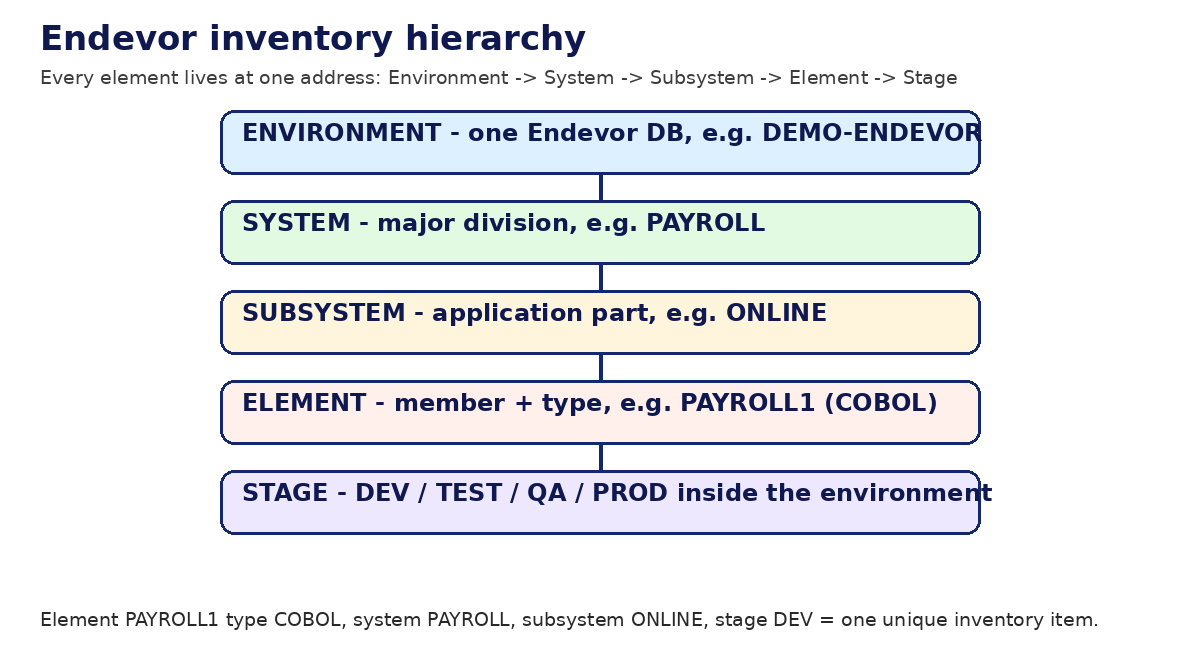
The address has five parts, always in this order: environment, system, subsystem, element name + type, stage. Learn this order once and every Endevor panel and SCL statement will make sense.
The five levels of the inventory
- Environment - one Endevor database. A shop may have DEMO (training), DEVLP (development), and PROD (production), or a single environment with many stages. Example: DEMO.
- System - a major application division inside the environment. Example: PAYROLL, ACCTS (accounts), HR.
- Subsystem - a functional part of a system. Example: ONLINE (CICS programs) and BATCH (batch programs) inside PAYROLL.
- Element - one member under control, identified by name plus type. Example: element PAYROLL1 of type COBOL.
- Stage - the lifecycle step the element copy sits in: D (development), T (test), Q (quality assurance), P (production).
Element types - the most common ones
- COBOL / COB - COBOL source programs. COPY / CPY - copybooks included by programs.
- ASM - Assembler source. PLI - PL/I source. C - C language source.
- JCL - job control language members. PROC - cataloged procedures.
- BMS - CICS BMS map source. LINK - linkage editor control cards.
- PROCESS - Endevor processor source itself (processors are stored as elements too).
- The type decides which processor group builds the element - type COBOL gets the COBOL compile processor.
A real example map
Here is a typical inventory map for a payroll application. The same element PAYROLL1 exists as separate stage copies that travel upward:
Environment : DEMO-ENDEVOR
System : PAYROLL
Subsystem : ONLINE (CICS programs)
Subsystem : BATCH (batch programs)
Element PAYROLL1, Type COBOL, Subsystem BATCH
Stage D (DEV) - current level 03, signed out to MAINFRM
Stage T (TEST) - current level 02, last moved 2026-10-01
Stage Q (QA) - current level 01, last moved 2026-09-20
Stage P (PROD) - current level 01, in production since 2026-09-25
Element PAYRATE, Type COPY, Subsystem BATCH
Stage D (DEV) - current level 05
Stage T (TEST) - current level 05
Stage Q (QA) - current level 04
Stage P (PROD) - current level 04
Entry stage and stage IDs
- Every environment has an entry stage - usually the DEV stage - where new elements are first added. You cannot ADD directly into PROD.
- Stage IDs are site-defined: letters (D, T, Q, P) or numbers (1, 2, 3) are both common. Your administrator's stage map is the authority.
- Stages can be mappable: Endevor knows that stage D maps up to stage T, T to Q, Q to P, so a MOVE knows its default target.
- An element can exist in several stages at once at different levels - that is normal during a release cycle.
Stage lifecycle with a worked example
- Developer adds PAYROLL1 (COBOL) to stage D, level 01. Signs it out, edits, updates to level 02, generates it.
- Unit test passes. Developer MOVEs PAYROLL1 from stage D to stage T. Endevor copies the source and regenerates it in T.
- Integration testing in T passes. A package carries PAYROLL1 from T to Q after approvals.
- QA signs off. The package executes the move from Q to P. Production now runs the new level.
- Next change starts again at D: the developer retrieves, edits, updates to level 03 - the cycle repeats.
Base and delta libraries - how history is stored
- Endevor keeps the full current source of each element in a base library (a PDS).
- Older levels are stored as deltas - only the differences from the current level - in delta libraries, saving disk space.
- When you retrieve an old level, Endevor rebuilds it by applying deltas in reverse. This is invisible to you.
- Retention rules decide how many levels are kept; very old levels may be aged off to archive.