
 Mainframe Tutorial
 JCL Tutorial
 Introduction
 Mainframe Tips & Tricks
 Mainframe Interview Q&A
 Troubleshooting
 Mainframe Quiz
 Mainframe Online Tests
 Mainframe Jokes/Memes
 Mainframe Tools
 Contact us
 About us
Module 1: MVS Concepts Overview
 Backward

MVS- Concepts Overview
MVS stands for Multiple Virtual Storage. It is the operating system that runs on IBM mainframe computers.
Today the current version of MVS is called z/OS. When people say MVS today, they usually mean the core of z/OS (the Basic Control Program).
This page explains the big ideas of MVS: what it manages, how it shares the machine between many users, and how batch and online work differ.
What is MVS
- MVS = Multiple Virtual Storage.
- It is an operating system for IBM mainframe computers.
- The key idea: every job and every user gets its own virtual address space.
- MVS grew through MVS/370, MVS/XA, MVS/ESA, OS/390, and is now called z/OS (64-bit).
- z/OS is designed for thousands of concurrent users, heavy I/O, and very large workloads.
IBM mainframe processors
- A mainframe processor has a CPU, main storage, and channels.
- Channels are small I/O processors that move data between memory and devices, so the CPU stays free for programs.
- PR/SM (Processor Resource/System Manager) divides one machine into logical partitions (LPARs). Each LPAR can run its own operating system.
- Processor history: System/360 (1964) -> System/370 -> S/390 -> zSeries/z (64-bit addressing).
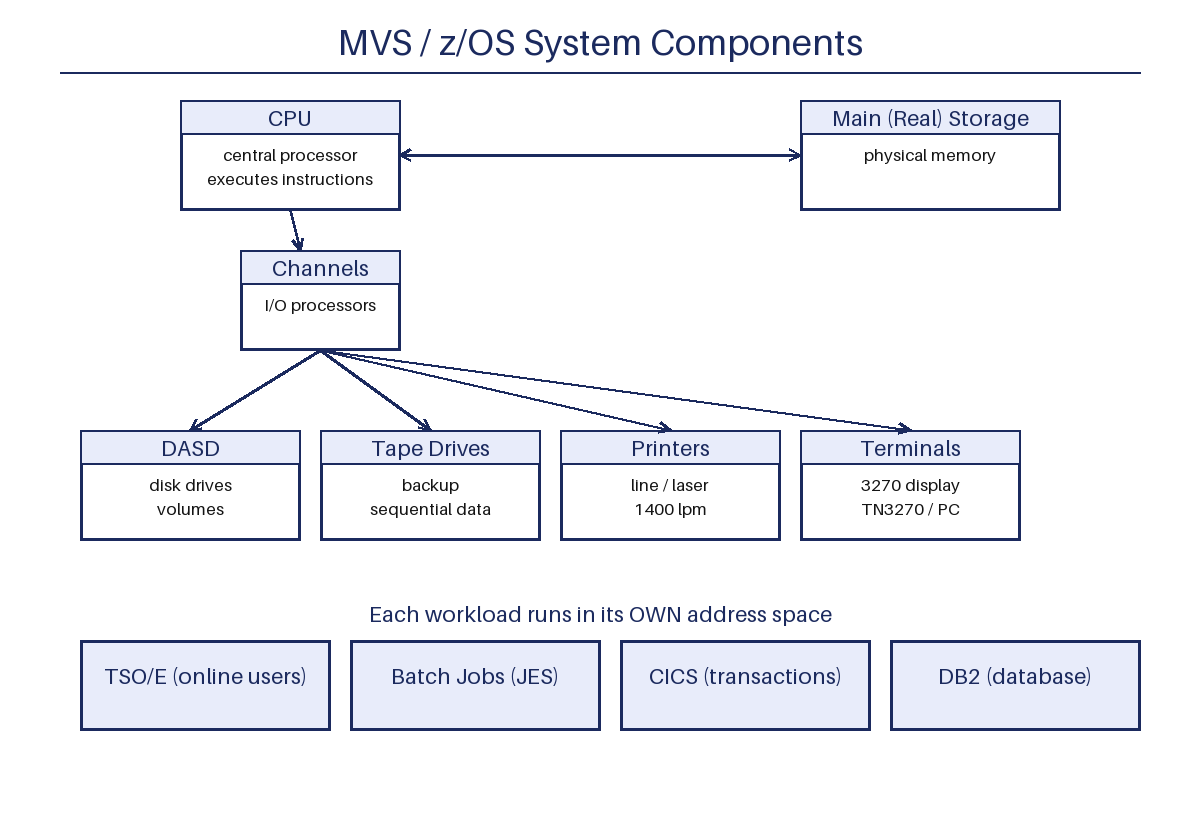
Hardware resources managed by MVS
- MVS controls the CPU, real storage, channels, and all I/O devices.
- It shares this hardware safely between hundreds of programs and users.
- It protects one program's memory and data from another program.
- It recovers from most hardware and software errors without stopping the system.
Input/output devices
- DASD (Direct Access Storage Device): disk drives that hold data sets and the operating system itself.
- Magnetic tape drives: mainly used for backup and sequential data.
- Printers: line printers print up to about 1400 lines per minute.
- Display terminals: the 3270 family, or PCs with 3270 emulation software (TN3270 over TCP/IP).
- Channels connect the I/O devices to the CPU.
Virtual storage
- Virtual storage makes the machine look like it has more memory than it physically has.
- The system uses disk space (page data sets) to simulate and extend real storage.
- The part of a program that is running now stays in real storage; the rest waits on disk.
- Virtual storage is divided into 4 KB sections called pages.
- Moving a page from disk to real storage is a page-in; moving it back is a page-out.
Address spaces
- An address space is the complete range of virtual storage addresses available to a user or program.
- Every TSO user, every batch job, CICS, and DB2 each run in their own address space.
- Each address space sees the same range of addresses, but their private areas are isolated from each other.
- A program error in one address space cannot damage data in another address space.
Multiprogramming and multiprocessing
- Multiprogramming: more than one program runs on the processor at the same time.
- Programs spend most of their time waiting for I/O. While one waits, another runs, so the CPU is used efficiently.
- Multiprocessing: several CPUs inside one system share the same memory and I/O.
Batch processing
- In batch processing, jobs run without any user interaction.
- A job is one or more programs run in sequence, described by Job Control Language (JCL).
- A job scheduler (JES) picks jobs from a queue and runs them when resources are free.
- Typical batch work: payroll runs, nightly billing, report generation.
Time sharing (online processing)
- In time sharing, many users interact with the computer at the same time through terminals.
- Each user logs on (TSO/E) and gets commands processed immediately.
- Also called interactive or online processing.
- Example: one user edits JCL in ISPF while another runs an order-entry program.
Spooling
- Spooling means holding printed output on disk before it goes to a real printer.
- Each program writes its output to a spool file on the spool disk.
- JES later sends the spooled output to the correct printer or holds it.
- This lets many programs "print" at once without waiting for a slow printer.
Operating system family: MVS to z/OS
- OS/360 (1964) -> OS/VS1, OS/VS2 (SVS) -> MVS/370 (24-bit) -> MVS/XA (31-bit) -> MVS/ESA (31-bit) -> OS/390 (31-bit) -> z/OS (64-bit).
- Older names you may still see: MFT, MVT, SVS (Single Virtual Storage).
- z/OS can be a 64-bit system with huge address spaces, while old 24-bit MVS could address only 16 MB.
Base services of z/OS
- Basic Control Program (BCP, the MVS core): task, storage, and I/O management.
- JES2 or JES3: job entry subsystem, handles batch jobs.
- Workload Manager (WLM): assigns CPU and storage by performance goals.
- DFSMS: automates storage management for data sets.
- UNIX System Services: lets the mainframe run UNIX programs and files.
- Communication Server: TCP/IP and networking.