
 Mainframe Tutorial
 JCL Tutorial
 Introduction
 Mainframe Tips & Tricks
 Mainframe Interview Q&A
 Troubleshooting
 Mainframe Quiz
 Mainframe Online Tests
 Mainframe Jokes/Memes
 Mainframe Tools
 Contact us
 About us
Module 3: DB2 Objects
 Backward

DB2 Object Relationships
DB2 objects are organized in a hierarchy. A database contains tablespaces, a tablespace contains tables, and indexes, views, aliases and synonyms all point back to tables. The diagram below shows how the objects fit together.
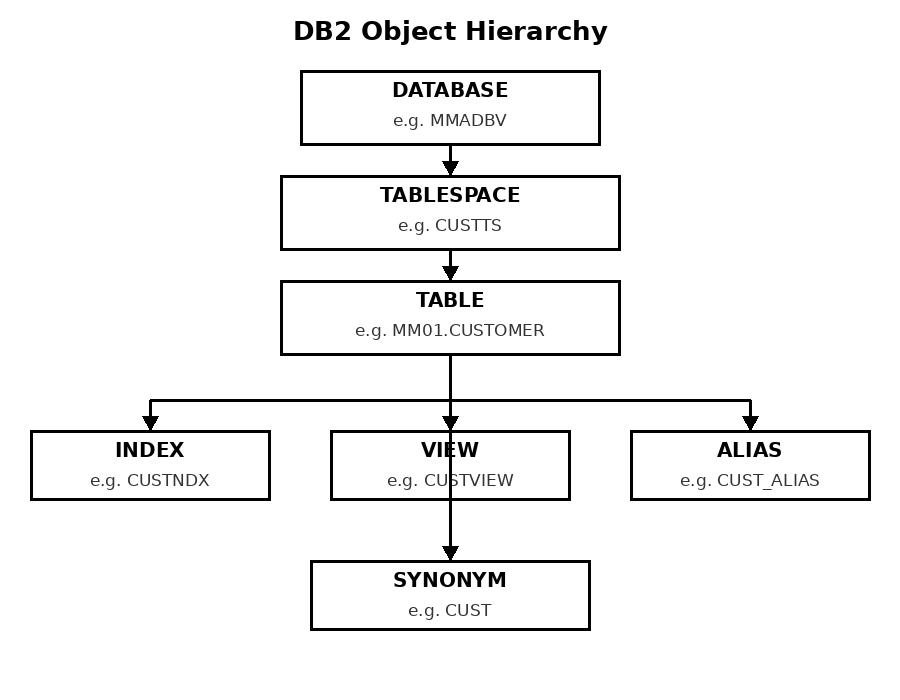
The hierarchy, top to bottom
- DATABASE :- The top-level collection of objects, usually one per application. It has a DBD that describes everything inside it.
- TABLESPACE :- Lives inside a database and physically stores tables. Simple, segmented or partitioned depending on size and usage.
- TABLE :- Lives inside a tablespace and holds the rows and columns of data. Created with an IN DATABASE clause pointing at the database and tablespace.
- INDEX :- Built on a table's columns for fast access. DB2 creates its indexspace automatically - one index per indexspace.
- VIEW :- A virtual table defined by a SELECT on one or more tables. It stores no data and is dropped if its base table goes away.
- ALIAS and SYNONYM :- Alternate names pointing at a table or view. Aliases are shareable and survive a table drop; synonyms are private and die with the table.
Creating the objects together - example
- Objects are created top-down: database first, then tablespace, then table, then the dependent objects:-
CREATE DATABASE MMADBV; CREATE TABLESPACE CUSTTS IN MMADBV USING STOGROUP SG1; CREATE TABLE MM01.CUSTOMER (CUSTNO CHAR(6) NOT NULL, FNAME CHAR(20) NOT NULL, LNAME CHAR(30) NOT NULL, PRIMARY KEY (CUSTNO)) IN MMADBV.CUSTTS; CREATE UNIQUE INDEX MM01.CUSTNDX ON MM01.CUSTOMER (CUSTNO); CREATE VIEW MM01.CUSTVIEW AS SELECT CUSTNO, LNAME FROM MM01.CUSTOMER; CREATE ALIAS MM01.CUST_ALIAS FOR MM01.CUSTOMER;