
 Mainframe Tutorial
 JCL Tutorial
 Introduction
 Mainframe Tips & Tricks
 Mainframe Interview Q&A
 Troubleshooting
 Mainframe Quiz
 Mainframe Online Tests
 Mainframe Jokes/Memes
 Mainframe Tools
 Contact us
 About us
Module 10: DB2 Cursors
 Backward

What is a Cursor?
A cursor is a pointer to a set of rows returned by a SELECT statement. It lets a COBOL program read the rows one at a time instead of getting them all at once.
Why cursors are needed
- A singleton SELECT (SELECT ... INTO host-variables) returns only one row at a time.
- Cursors are used when more than one row of the table is to be processed.
- By using a cursor, the program can retrieve each row sequentially from the result table until end of data (SQLCODE = 100).
- Think of a cursor as a pointer that moves through the result rows, pointing at one row at a time.
- Without a cursor, a program has no way to loop through many rows returned by a SELECT.
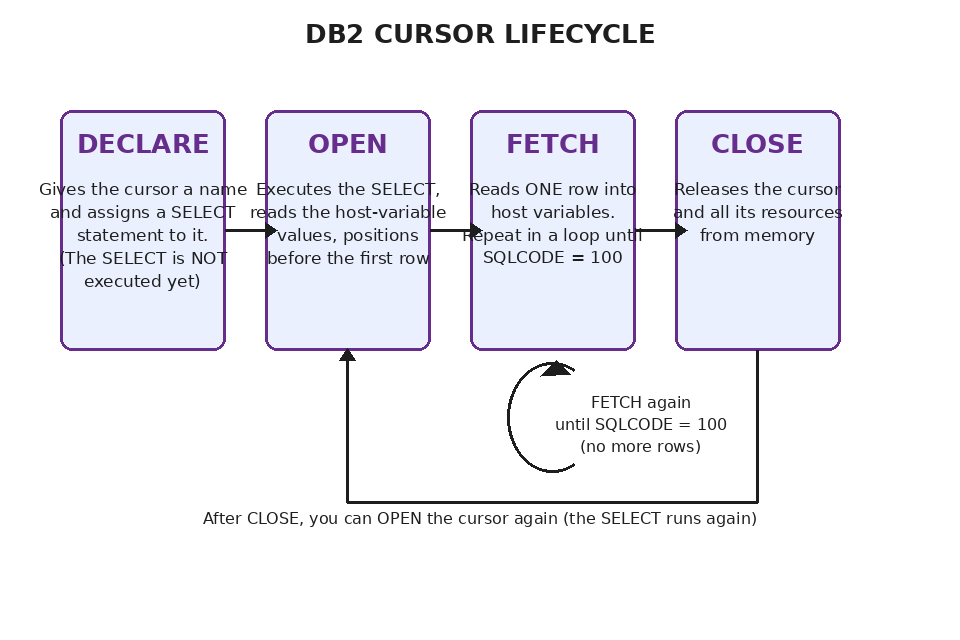
The four steps of a cursor
- DECLARE - gives the cursor a name and assigns an SQL SELECT statement to it. It is coded in the Working-Storage Section.
- OPEN - readies the cursor for row retrieval. It executes the SQL statement and points before the first row of the result set. It is coded in the Procedure Division.
- FETCH - returns data from the result table one row at a time into host variables. The program calls FETCH inside a loop until SQLCODE = 100 (no more rows).
- CLOSE - releases all resources used by the cursor. After CLOSE, the cursor can be OPENed again if needed.
Cursor vs singleton SELECT
- Singleton SELECT (SELECT ... INTO) is used when you expect exactly one row, for example SELECT ... WHERE EMPNO = :ENO.
- If a singleton SELECT returns more than one row, DB2 raises an error with SQLCODE -811.
- If a singleton SELECT returns no rows, SQLCODE = 100 is returned (NOT FOUND).
- Use a cursor whenever the SELECT can return zero, one, or many rows and the program must handle each row.
- The same SQLCODE 100 means 'end of cursor' during FETCH and 'no rows found' for singleton SELECT - check it after every statement.