
 Mainframe Tutorial
 JCL Tutorial
 Introduction
 Mainframe Tips & Tricks
 Mainframe Interview Q&A
 Troubleshooting
 Mainframe Quiz
 Mainframe Online Tests
 Mainframe Jokes/Memes
 Mainframe Tools
 Contact us
 About us
Module 3: MVS Catalog
 Backward

MVS- Catalog
A catalog is the directory of data sets on an MVS system. It connects a data set name to the disk volume where the data set lives.
Without a catalog entry, the system cannot find your data set by name alone - you must also tell it the volume.
What the catalog is
- A catalog associates a data set with the volume on which it is located.
- A catalog entry stores: the data set name, the volume serial (volser), the unit (device type), and device information.
- Locating a data set needs the data set name; the catalog supplies the volume and unit for you.
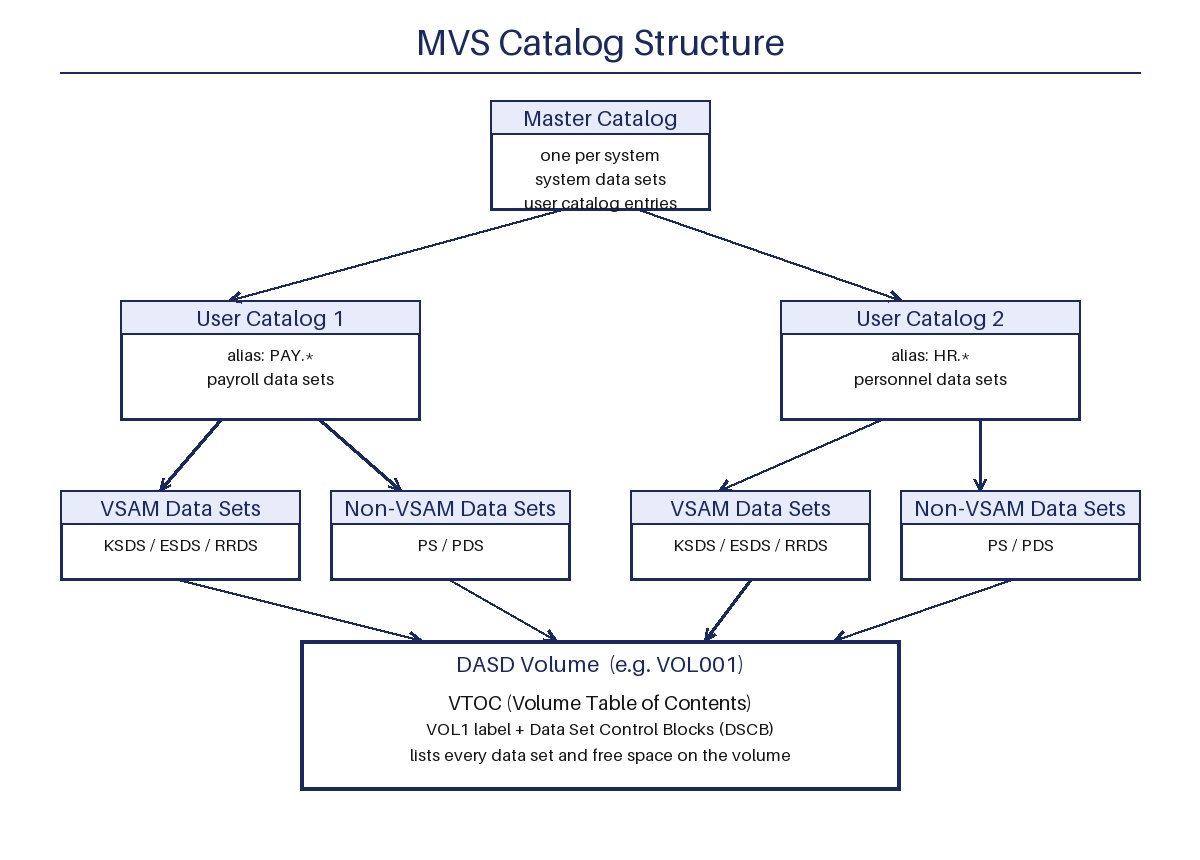
- A typical system has one master catalog and many user catalogs.
Master catalog and user catalogs
- The master catalog contains entries for system data sets and entries that point to user catalogs.
- User catalogs contain entries for user data sets.
- There is only one master catalog, but any number of user catalogs.
- VSAM data sets must be cataloged. Non-VSAM data sets do not have to be, because their labels are stored in the VTOC.
Catalog aliases
- The high-level qualifier (HLQ) of a data set name usually decides in which user catalog it is cataloged.
- A user catalog can have several aliases, so files with different HLQs can live in the same user catalog.
- Example: aliases PAY.* and PAYROLL.* can both point to the same user catalog.
- If the HLQ has no alias, the data set goes to the master catalog by default - which most shops forbid for user data.
How a data set is located
- Step 1: the system searches the catalog for the data set name.
- Step 2: the catalog entry gives the volume serial and unit.
- Step 3: the volume is located (mounted if needed) and its VTOC is read.
- Step 4: the VTOC's DSCB gives the exact location of the data set on the volume.
- Catalog search goes: master catalog -> matching user catalog -> data set entry.
Three levels of data set allocation
- Level 1 - unit allocation: the system picks the device. You can give a generic name (like 3390) or a group (esoteric) name.
- A group name such as SYSDA (disk for general use) or TAPE (tape drives) is defined by each installation.
- Level 2 - volume allocation: for a new data set you may give a specific volser, or let the system choose (non-specific request).
- Level 3 - data set allocation: for an existing data set the labels are checked; for a new data set the labels are created, space is allocated, and the VTOC is updated.
Disposition: old or new data set
- The DISP parameter in JCL tells the system whether the data set already exists or is new.
- DISP=(NEW,...): create the data set.
- DISP=(OLD,...): use an existing data set, with exclusive access.
- DISP=(SHR,...): use an existing data set, shared read access.
- DISP=(MOD,...): add records to the end of an existing data set, or create it if it does not exist.
- The second part of DISP says what to do at the end: CATLG (catalog it), KEEP, or DELETE.
// DISP examples
//INPUT DD DSN=MYID.DATA.INPUT,DISP=SHR
//OUTPUT DD DSN=MYID.DATA.OUTPUT,
// DISP=(NEW,CATLG,DELETE),
// UNIT=SYSDA,
// SPACE=(TRK,(5,2)),
// DCB=(RECFM=FB,LRECL=80,BLKSIZE=800)
//APPEND DD DSN=MYID.DATA.LOG,DISP=MOD
OPEN modes and CLOSE
- Before a program does I/O on a data set, it must issue an OPEN.
- INPUT mode: records can only be read from an existing data set.
- OUTPUT mode: records can only be written to a new or existing data set.
- I/O mode: records can be read, written, updated, and deleted.
- When finished, the program issues a CLOSE to disconnect from the data set.
- A data set is automatically deallocated when the job step ends.
LISTCAT: list catalog entries with IDCAMS
- IDCAMS LISTCAT displays catalog information about data sets.
- LISTCAT ENTRIES(name) shows one data set; ALL shows full details.
- LISTCAT LEVEL(qualifier) lists every entry starting with that qualifier.
- LISTCAT with CATALOG(name) searches a specific user catalog.
//LISTCAT JOB (ACCT),'LIST CATALOG',CLASS=A,MSGCLASS=X
//STEP1 EXEC PGM=IDCAMS
//SYSPRINT DD SYSOUT=*
//SYSIN DD *
LISTCAT ENTRIES(MYID.TEST.PSFILE) ALL
LISTCAT LEVEL(MYID.TEST) NAME
LISTCAT CATALOG(UCAT.PAY) LEVEL(PAY) ALL
/*
Binary, hexadecimal and EBCDIC notations
- Bits are binary digits: 0 (off) or 1 (on). Eight bits make one byte.
- Hexadecimal (hex) uses 16 digits: 0-9 and A-F. One hex digit represents 4 bits.
- Hex is used by mainframe debugging tools to display field contents.
- EBCDIC (Extended Binary Coded Decimal Interchange Code) is the character code used on IBM mainframes.
- Most other computers use ASCII (American Standard Code for Information Interchange).
- Examples: in EBCDIC, A = X'C1', space = X'40', digit 0 = X'F0'.
EBCDIC vs ASCII: collating sequence
- The character code decides the sort (collating) sequence of the computer.
- In EBCDIC, special characters come first, then letters, then numbers.
- In ASCII, special characters come first, then numbers, then letters.
- Moving data between mainframe and PC requires ASCII-to-EBCDIC conversion (or the reverse).
- The sort order of a file changes during the conversion, so re-sort after converting if order matters.