
 Mainframe Tutorial
 JCL Tutorial
 Introduction
 Mainframe Tips & Tricks
 Mainframe Interview Q&A
 Troubleshooting
 Mainframe Quiz
 Mainframe Online Tests
 Mainframe Jokes/Memes
 Mainframe Tools
 Contact us
 About us
Module 15: Advanced DB2 and Interview Preparation
 Backward

MERGE
The MERGE statement combines INSERT, UPDATE, and DELETE into one statement. It compares a source result set with a target table and applies changes based on whether each row matches.
What is MERGE
- It is also called an upsert: update the row if it exists, insert it if it does not.
- One MERGE replaces separate SELECT-then-INSERT-or-UPDATE program logic, so it is faster and simpler.
- The matching condition is written in the ON clause, just like a join condition.
- It is ideal for loading staged or daily feed data into master tables.
How MERGE works
-
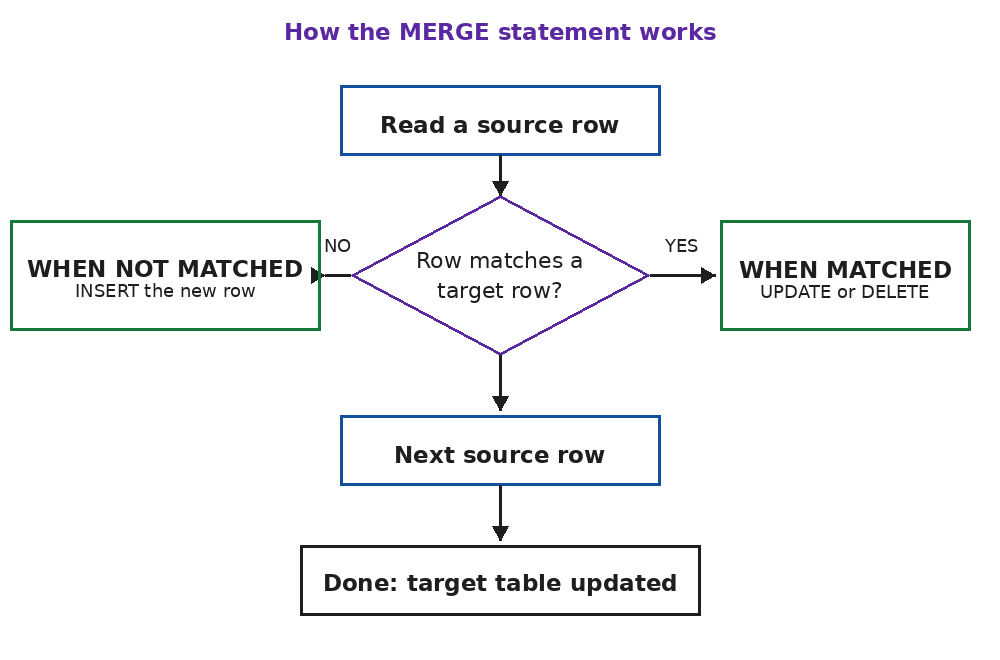
- Each source row is checked against the target using the ON condition.
- WHEN MATCHED fires for rows found in the target; typically you UPDATE them, or DELETE them.
- WHEN NOT MATCHED fires for source rows with no target row; typically you INSERT them.
- WHEN NOT MATCHED BY SOURCE (optional) handles target rows missing from the source.
Example: MERGE daily feed into employee table
- Example that updates existing employees and inserts new ones from a staging table:- MERGE INTO EMPLOYEE AS T USING (SELECT EMPNO, SALARY, PHONENO FROM EMP_STAGE) AS S ON T.EMPNO = S.EMPNO WHEN MATCHED THEN UPDATE SET SALARY = S.SALARY, PHONENO = S.PHONENO WHEN NOT MATCHED THEN INSERT (EMPNO, SALARY, PHONENO) VALUES (S.EMPNO, S.SALARY, S.PHONENO);